
Overview
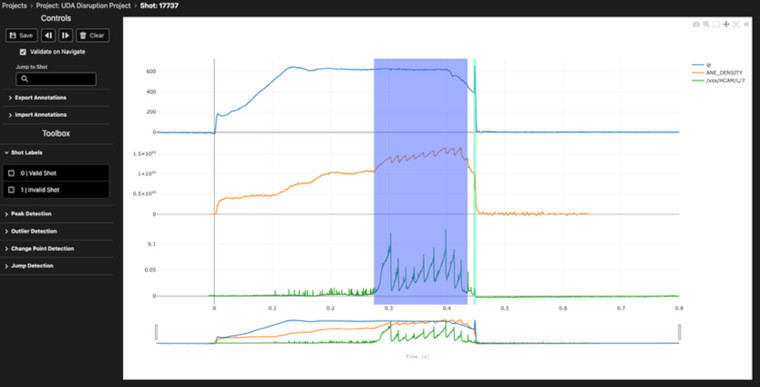
TokTagger is an open-source, web-based platform for labelling and tagging tokamak diagnostic data. It lets researchers browse experimental shots, inspect synchronised signals, images and video, and apply consistent labels through a single interface -turning raw fusion diagnostic data into curated, machine-learning-ready datasets.
Who it’s for
TokTagger is for diagnostic physicists and machine learning researchers working with tokamak experimental data. It initially supported labelled dataset creation from MAST Upgrade diagnostics at UKAEA. It was later released for the wider fusion data science community, particularly groups working with the UDA, SAL and FAIR-MAST data systems.
TokTagger details
Tokamak fusion experiments MAST, MAST Upgrade, and the Joint European Torus (JET) produce large volumes of multi-modal diagnostic data on every experimental pulse. This includes:
- scalar time-series signals (plasma current, density, D-alpha emission)
- camera video
- derived spectrograms
Understanding and controlling plasma behaviour depends on identifying physical events within this data. This includes edge-localised modes (ELMs), L-mode / H-mode transitions and disruptions.
Closing the gap between labelling data and training machine learning models
Historically, physicists identified these events manually on a shot-by-shot basis. This approach no longer scales as experiments grow in number and diagnostic bandwidth. TokTagger closes the gap between labelling this data and using it to train machine learning models. It provides a project-based workflow in which a physicist:
- defines a labelling task
- attaches one of several tokamak-aware data loaders
- browses and labels samples through a web UI
TokTagger supports visualising and jointly labelling multiple synchronised diagnostic signals per sample – unlike general-purpose annotation tools. It ships with connectors to fusion data systems – UDA (MAST / MAST Upgrade), SAL (JET) and the community-run FAIR-MAST repository. This removes the need for a separate data-export step. Automated annotators (peak, change-point, jump and outlier detection) suggest candidate labels to accelerate manual work. A frame-by-frame interface supports bounding box, polygon and point annotations on camera and video data.
Human-in-the-loop active learning system
The platform couples labelling directly to modelling through a human-in-the-loop active learning system. Models are trained on the current set of annotations, predictions are surfaced back into the UI with uncertainty estimates, and an uncertainty-based query strategy selects which unlabelled samples to review next.
Extensible registries for data loaders, annotators and models let users add domain-specific functionality without modifying the core code. UKAEA uses TokTagger to curate labelled datasets supporting machine learning models for tasks such as automated ELM and disruption detection from MAST Upgrade and JET diagnostics.
UKAEA, Culham Science Centre and the Science and Technology Facilities Council (STFC) developed TokTagger.
Licence
MIT Licence
Release date
First public release (v0.1.0): 10 March 2026. Latest release (v0.3.1): 3 July 2026.
Programming languages
Python (FastAPI backend and public API) and TypeScript/React (web frontend). Requires Python 3.10–3.13.
Dependencies
Backend
- FastAPI
- Uvicorn
- Pydantic
- xarray
- NumPy
- SciPy
- pandas
- scikit-learn
- Zarr
- fsspec/s3fs
- PyMongo (MongoDB)
- Pillow
- ruptures
- hmmlearn
Fusion data access
- UDA
- SAL (with uda-xarray and sal-xarray)
Optional ML extras
- (toktagger[models]): PyTorch
- Ray
Frontend
- React
- TypeScript
- Vite
- Plotly.js
- D3
- OpenSeadragon/Annotorious
- Adobe React Spectrum
Services
MongoDB (a local embedded database is used by default via mongita).
Compatible platforms / systems
Cross-platform. Runs anywhere Python 3.10–3.13 is available (Linux, macOS, Windows) – continuous integration runs on Linux.
Installable from PyPI via pip or uv, or deployable with the supplied Docker Compose configuration for multi-user/team setups.
The user interface is browser-based and served locally by default at http://localhost:8002.
Model training and inference are scheduled with Ray, so the same code runs unmodified on a laptop (CPU or GPU) or distributed across a shared cluster.